
Subscriptions Overview
Localpayment provides powerful subscription billing capabilities, enabling you to set up recurring payments for both fixed plans and custom billing scenarios. This section offers a comprehensive overview of subscription functionalities, workflows, and key considerations for integrating recurring payments into your Localpayment setup.
Supported Countries & Coverage
Our subscription service is available across key Latin American markets, supporting both scheduled and on-demand recurring payments via credit and debit cards. Each supported country has detailed documentation covering specific requirements, processing times, and available features.
Use Cases
Manage recurring monthly or annual subscriptions for digital content
platforms. Support tiered pricing with different feature sets.
Handle software subscription billing with multiple plan levels. Perfect for
B2B and B2C software platforms.
Automate gym memberships, club fees, and loyalty program payments with
flexible billing cycles.
Set up recurring payments for telecommunications, internet, and other
monthly utility bills.
Support variable recurring payments for services like ride-sharing,
delivery, and freelance marketplaces.
How It Works
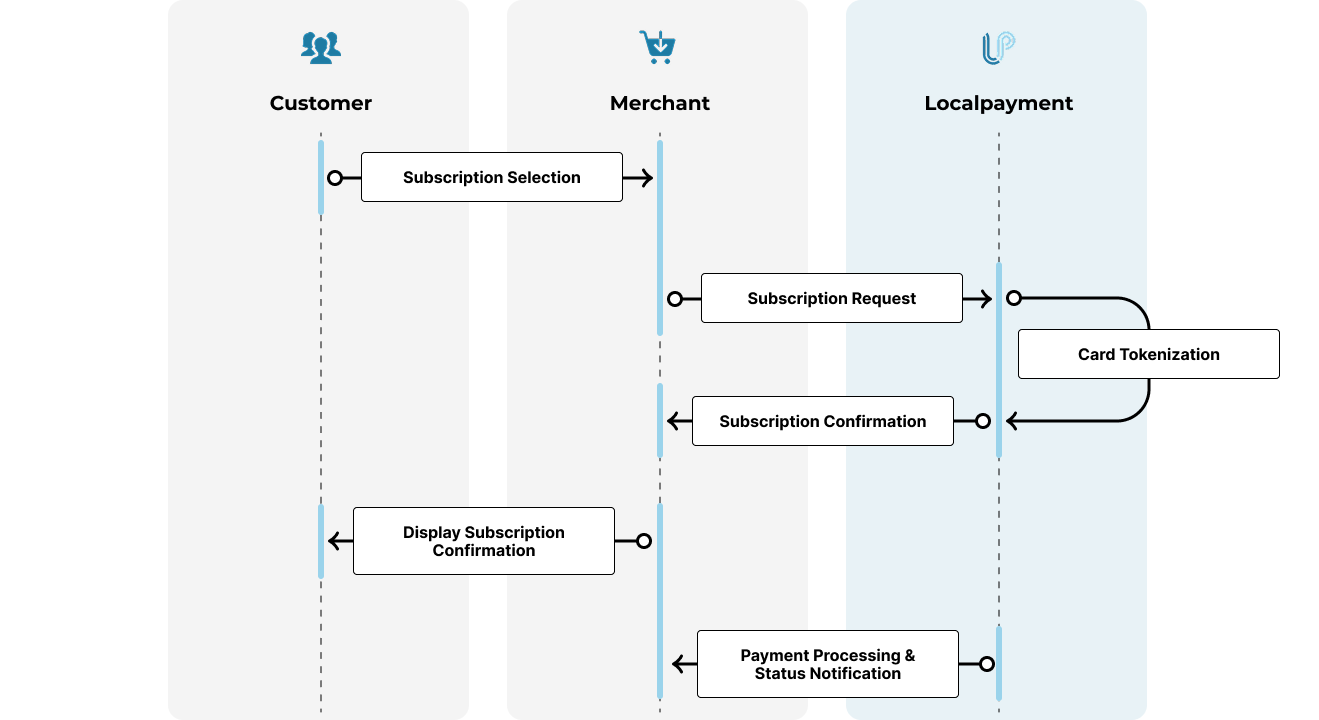
Localpayment enables merchants to automate recurring card payments and manage subscription billing through a secure, streamlined process. The subscription workflow involves coordinated actions between your customers, your application, and Localpayment's infrastructure.
- Subscription Selection: Customer chooses a subscription plan and enters payment details in your checkout.
- Subscription Request: Your application sends subscription creation request with payment data to Localpayment API.
- Card Tokenization: Localpayment securely tokenizes card details and validates payment method for recurring use.
- Subscription Confirmation: Localpayment returns subscription ID and confirmation to your application.
- Display Subscription Confirmation: Merchant application shows confirmation page with subscription details and next billing date to customer.
- Payment Processing: Localpayment automatically processes card payments according to billing schedule.
- Status Notification: Localpayment sends webhook notifications to merchant for payment successes, failures, and subscription changes.
Prerequisites
Before setting up your first subscription, ensure you've completed these essential requirements:
Implementation Guide
Localpayment enables you to manage recurring payments through comprehensive API endpoints that handle the complete subscription lifecycle. Below are the key operations for managing subscriptions and plans.
Establish a new subscription with either a predefined plan or custom parameters. Supports both scheduled and on-demand billing models.
Modify existing subscription details including billing amount, frequency, or customer information. Handle upgrades and downgrades seamlessly.
Terminate active subscriptions while preserving transaction history. Supports immediate cancellation or end-of-billing period options.
Define fixed billing plans with preset amounts and intervals. Ideal for standardized pricing tiers and membership levels.
Modify existing plan details while maintaining associations with active subscriptions. Update pricing or features across your customer base.
Retrieve detailed information about specific subscription plans including pricing, billing cycles, and associated subscriptions.
Failed Charges & Retry Logic
When a subscription charge fails, Localpayment offers automated recovery mechanisms and real-time monitoring to ensure continuity for your business and your customers.
Individual Charge Monitoring
Each individual payment attempt within a subscription is treated as a standard Payin transaction. If a charge fails (due to insufficient funds, expired card, or other reasons), Localpayment issues a PayIn webhook notification with the specific error code (e.g., 300 - Rejected). Monitoring these webhooks is the primary way to track real-time payment health.
Automated Retry Mechanism (Dunning)
To recover failed charges, you can configure the retry object during subscription or plan creation. This automated dunning process helps recapture revenue without manual intervention:
retry.repetitions: The number of times the system will attempt to re-process the failed charge.retry.intervalValue&retry.intervalUnit: Define the delay between each retry attempt (e.g., every 1 day or every 12 hours).
Subscription Cancellation due to Failures
If all configured retry attempts are exhausted and the payment is still not successful, the subscription will automatically change its lifecycle status to:
904- Cancelled - too many failed attempts: This indicates that the subscription has reached its retry limit and is now permanently inactive. No further automatic charges will be attempted for this subscription.
Subscription Types
Localpayment supports two main subscription models to accommodate different business needs. Choose the approach that best fits your billing requirements.
Ideal for businesses with standardized recurring charges. First create a
subscription plan, then associate it with customer subscriptions.
Common use cases:
- Gym memberships with different tiers
- Streaming service plans
- Software subscription levels
- Standardized membership fees
Perfect for variable billing scenarios where each payment may differ in amount or timing.
Common use cases:
- First-month discounts with regular pricing
- Usage-based billing models
- On-demand services with recurring relationships
- Promotional pricing scenarios
Subscription Operations
Once a subscription is created, various operations can be performed to manage the subscription lifecycle. Here's an overview of available operations across supported countries:
| Country | Plan Updates | Subscription Updates | Cancellations | Chargeback | Webhooks |
|---|---|---|---|---|---|
| Colombia | ✔ | ✔ | ✔ | ✔ | ✔ |
| Mexico | ✔ | ✔ | ✔ | ✔ | ✔ |
| Peru | ✔ | ✔ | ✔ | ✔ | ✔ |
Updated 3 days ago