
Get Virtual Account Status
This guide outlines the different approaches for tracking virtual account status and managing account lifecycle.
Localpayment provides multiple methods to monitor and retrieve the current status of virtual accounts, including individual account checks, batch processing status, and business portal visualization.
Availability
Virtual Account status monitoring is available in all countries where virtual accounts are supported:
| Country | Supported Methods |
|---|---|
| Argentina | Individual API, Batch API, Business Portal |
| Brazil | Individual API, Batch API, Business Portal |
| Chile | Individual API, Batch API, Business Portal |
| Colombia | Individual API, Batch API, Business Portal |
| Costa Rica (CRC & USD) | Individual API, Batch API, Business Portal |
| Mexico | Individual API, Batch API, Business Portal |
| Peru | Individual API, Business Portal |
Before You Begin
Ensure you have:
- Valid API credentials (access token).
- Virtual account IDs or batch reference numbers you want to check.
Virtual Account Status Reference
Virtual accounts can have the following statuses throughout their lifecycle:
| Status | Status Code | Description |
|---|---|---|
| INPROGRESS | 100 | Virtual account creation in progress |
| COMPLETED | 200 | Virtual account active and ready for payments |
| DISABLED | 300 | Virtual account has been temporarily disabled and cannot be used for transactions |
| DELETED | 908 | Virtual account has been permanently deleted |
Status codes are not exclusive to virtual account statuses. For example, code
300also appears with descriptionREJECTEDon the Create a Virtual Account endpoint when a request fails validation. Always readstatus.codetogether withstatus.descriptionrather than relying on the code alone.
Retrieve Virtual Account Information
After requesting your virtual account, you'll be able to check its status using any of the following methods:
Retrieve the current status and details of a specific virtual account using the API endpoint with the external ID.
Monitor the status of virtual accounts created in batch operations, including creation progress and any errors.
Use the visual business portal interface for manual monitoring, filtering, and bulk operations on virtual accounts.
Method 1: Check Individual Virtual Account Status
Retrieve the current status and details of a specific virtual account using the individual status endpoint.
Example Request
Send a GET request to the Get Virtual Account Status endpoint. Below is an example using curl:
curl --request GET \
     --url https://api.stage.localpayment.com/api/virtual-account/{externalId} \
  --header 'Authorization: Bearer <your_access_token>' \
     --header 'accept: application/json'
Key Request Parameters
The request requires several key objects:
| Object | Description | Required |
|---|---|---|
externalId | The external ID used when creating the virtual account. | ✅ |
Successful Response
{
  "currency": "MXN",
  "externalId": "f059a032-9253-4607-9b8e-2948ed18d595",
  "internalId": "9a8db65f-be31-42fb-8ebd-5fffd83bd6c6",
  "accountNumber": "{{accountNumber}}",
  "beneficiary": {
    "type": "INDIVIDUAL",
    "name": "Alejandra",
    "lastName": "Guzman",
    "fullName": "Alejandra Guzman",
    "document": {
      "type": "RFC",
      "id": "KCWV771228TS4"
    },
    "address": {
      "street": "Avenida Reforma",
      "number": "500",
      "city": "Ciudad de Mexico",
      "state": "CDMX",
      "country": "Mexico"
    }
  },
  "status": {
    "code": "100",
    "description": "INPROGRESS",
    "detail": "Virtual account in progress"
  },
  "errors": []
}
Key Response Fields
| Field | Description | Use Case |
|---|---|---|
internalId | Localpayment's unique identifier for the virtual account. | Support and system reference |
externalId | Your original reference number for the virtual account. | Internal reconciliation and tracking |
status.code | Current status code of the virtual account. | Determine account usability and next actions |
Method 2: Check Batch Virtual Account Status
Monitor the status of virtual accounts created in batch operations, including creation progress and any errors.
Example Request
Send a GET request to the Get Virtual Account Status (Batch) endpoint. Below is an example using curl:
curl --request GET \
     --url https://api.stage.localpayment.com/api/virtual-account-batch/{externalId} \
  --header 'Authorization: Bearer <your_access_token>' \
     --header 'accept: application/json'
Key Request Parameters
The request requires several key objects:
| Object | Description | Required |
|---|---|---|
externalId | Batch reference number. | ✅ |
Successful Response
{
  "externalId": "ba671d03-b3bc-4312-8841-5c65a67713ca",
  "internalId": "91c0de90-9d70-44a6-b9c6-600f835802b6",
  "accountNumber": "{{accountNumber}}",
  "status": {
    "code": "200",
    "description": "COMPLETED",
    "detail": "Batch Process Virtual Account completed"
  },
  "comment": "The batch process is done - The process started at = 2025-01-03 22:59:14.355 - Total accounts requested = 12 - Total accounts created = 12 - The process finished at = 2025-01-03 22:59:17.716 - ",
  "csvFormatResponse": "internal_id,external_id,bank_account\ne68208a1-3197-4b1e-82f6-76525a734e56,1111111111-1,646011319800023500\n80dcc234-1010-427b-b256-3fff18325baf,1111111111-2,646011319800023501\nd779c2ab-2505-43b8-874c-fcb97a2e5fb7,1111111111-3,646011319800023502\nafd67163-fd79-4b2c-b288-c4d253bcec57,1111111111-4,646011319800023503\n01e1d1bb-c89c-4d41-849d-bd1d8e5c3785,1111111111-5,646011319800023504\n0ba88114-ae62-407b-9f03-8f863000c163,1111111111-6,646011319800023505\n0184a17a-5c38-4c43-b10a-15079662e518,1111111111-7,646011319800023506\nb80991f5-396d-485a-b480-fdfb8635bef3,1111111111-8,646011319800023507\ncd0f6180-c3ad-4a69-815f-25d6f053aee2,1111111111-9,646011319800023608\n95ea6157-2d17-459c-969a-708ca31cfc13,1111111111-10,646011319800023609\ncf50e4d2-ac34-48f4-a60f-b2ee8b152f6a,1111111111-11,646011319800023610\n70d1f0be-3db0-48fd-8493-b712038ea48e,1111111111-12,646011319800023611\n"
}
Key Response Fields
| Field | Description | Use Case |
|---|---|---|
internalId | Localpayment's unique identifier for the virtual account. | Support and system reference |
externalId | Your original reference number for the batch operation. | Internal reconciliation and tracking |
status.code | Current status code of the batch process. | Determine account usability and next actions |
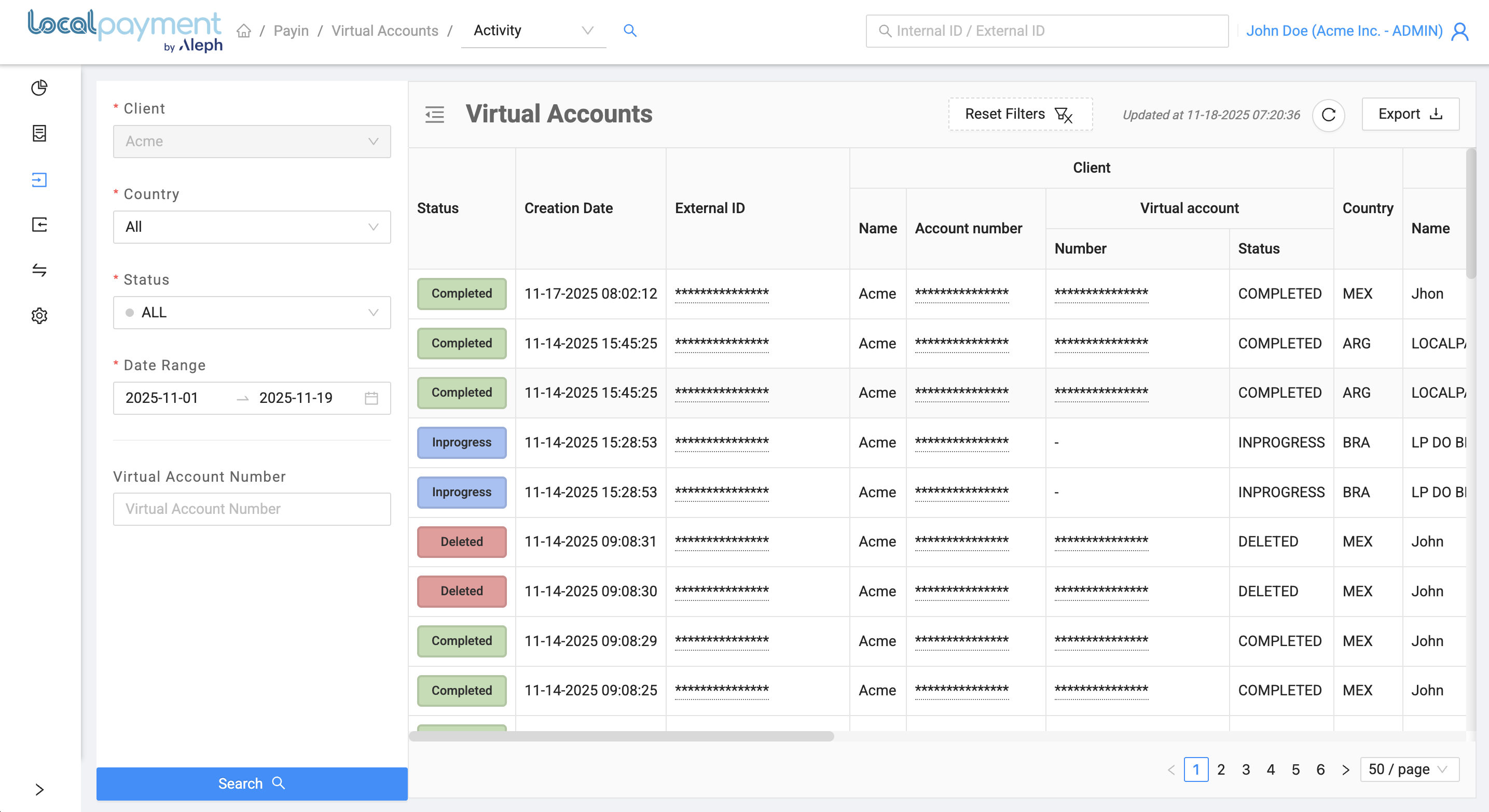
Method 3: Check Virtual Account Status via Business Portal
For manual monitoring and visual analysis, use the Localpayment Business Portal to view virtual account status.
Business Portal Access
- Log in to your Localpayment Business Portal
- Navigate to PayIn > Virtual Accounts > Activity section
- Use filters to search by:
- Country: Choose a specific country or select All to include all available countries.
- Status: Filter accounts by their current status or select All to view accounts with any status.
- Date Range: Specify the date range for when the virtual accounts were created. This filters the list based on creation date, not activity date.
- Virtual Account Number: You can search directly by the Virtual Account Number (VAN) to quickly locate a specific entry.
Next Steps
After monitoring virtual account status, you may need to perform additional management actions:
Provide payers with the correct beneficiary details returned in the Get Virtual Account Status API response to process payments seamlessly. View country-specific instructions to ensure accurate and compliant payment execution.
Temporarily suspend or reactivate virtual accounts based on business needs
or customer requests.
Permanently deactivate a virtual account. This prevents all future payments to it but retains its full history. The action is irreversible. Use for accounts no longer needed; create a new one to resume operations.
Updated 14 days ago