
Pix (Brazil)
Localpayment enables merchants to process instant payments through Brazil's Pix system, the country's revolutionary instant payment platform developed by the Central Bank of Brazil. This guide outlines the process for initiating Pix payments through Localpayment's API, detailing required parameters, handling responses, and interpreting status codes for seamless integration with Brazil's real-time payment infrastructure.
Pix is Brazil's instant payment system, developed by the Central Bank of Brazil (BCB). It enables individuals and businesses to send and receive payments in seconds, 24/7, 365 days a year.
Localpayment supports two primary Pix payment methods:
- Pix QR Code: Customers scan a dynamic QR code with their banking app.
- Pix Copy and Paste (Copia e Cola): Customers copy a Pix code and paste it into their banking or digital wallet app to initiate the transfer.
Both methods use the same API endpoint and provide a fast, secure payment experience.
Before You Begin
Ensure you have:
- Valid API credentials (access token).
Step 1. Create Pix Payment
To generate a Pix payment for collection in Brazil, send a POST request to the Create Payin endpoint with Pix-specific parameters.
Key Request Parameters
The request requires several key objects specific to QR payments:
| Object | Description | Required |
|---|---|---|
paymentMethod.type | Must be BankTransfer. | ✅ |
paymentMethod.code | Use 1314 for Pix. | ✅ |
sender | Sender information for compliance. | ✅ |
merchant | Merchant/business details. | ✅ |
paymentMethod | Payment method configuration. | ✅ |
amount | Transaction amount. | ✅ |
currency | Transaction currency code. | ✅ |
country | Must be BRA. | ✅ |
See all available parameters in the request.
Same endpoint for both methods: This single API request is used to generate a payment for both Pix QR Code and Pix Copy and Paste (Copia e Cola). The method used by the customer is determined by how you present the payment details returned in the response.
Example Request
Below is an example using curl:
curl --request POST \
     --url https://api.stage.localpayment.com/api/payin/ \
     --header 'accept: application/json' \
     --header 'Authorization: Bearer <your_access_token>' \
     --header 'content-type: application/json' \
     --data '
{
  "paymentMethod": {
    "type": "BankTransfer",
    "code": "1314",
    "flow": "DIRECT"
  },
  "currency": "USD",
  "merchant": {
    "type": "COMPANY",
    "document": {
      "type": "",
      "id": ""
    },
    "name": "Company",
    "email": ""
  },
  "payer": {
    "type": "INDIVIDUAL",
    "document": {
      "id": "75.518.609/0001-56",
      "type": "CNPJ"
    },
    "bank": {
      "account": {
        "type": "C"
      }
    },
    "name": "John",
    "lastname": "Doe"
  },
  "externalId": "3d3b3e1d-c234-4fde-8e87-cd61b7dde3cf",
  "country": "BRA",
  "amount": 1000,
  "accountNumber": "{{accountNumber}}",
  "conceptCode": "0003",
  "comment": "Any relevant information related to the transaction"
}
'
Step 2. Handle the Response
Successful Response
A successful Pix payment creation includes the Pix code data and payment details:
{
  "transactionType": "PayIn",
  "externalId": "3d3b3e1d-c234-4fde-8e87-cd61b7dde3cf",
  "internalId": "7e57a8ed-7fa4-4264-bcf3-a44d3ff2c132",
  "paymentMethod": {
    "type": "BankTransfer",
    "code": "1314",
    "flow": "DIRECT"
  },
  "country": "BRA",
  "currency": "USD",
  "amount": 1000,
  "accountNumber": "{{accountNumber}}",
  "confirmed": {
    "currency": "USD",
    "amount": 1000,
    "fxQuote": 1,
    "exchangeRateToken": null
  },
  "payment": {
    "installment": null,
    "currency": "BRL",
    "fxQuote": 4.96637604,
    "financingFee": 0,
    "amount": 4966.38
  },
  "localTaxes": [],
  "withHoldings": [],
  "fees": {
    "description": "Fee",
    "currency": "USD",
    "fxSource": 1,
    "fxQuote": 1,
    "amount": 11,
    "account": "{{accountNumber}}"
  },
  "status": {
    "code": "100",
    "description": "INPROGRESS",
    "detail": "The payin is pending the confirmation"
  },
  "ticket": null,
  "qr": {
    "image": "https://api.stage.localpayment.com/api/images/1314/00020126580014br.gov.bcb.pix013627a44d0a-0736-4bbf-a4a4-6e11063973315204000053039865406150.005802BR5911Telequiet496008Campinas62230519mpqrinter12397252666304FA23",
    "code": "00020126580014br.gov.bcb.pix013627a44d0a-0736-4bbf-a4a4-6e11063973315204000053039865406150.005802BR5911Telequiet496008Campinas62230519mpqrinter12397252666304FA23",
    "codeBase64": "iVBORw0KGgoAAAANSUhEUgAABWQAAAVkAQAAAAB79iscAAAI/UlEQVR42u3dW47kNgwFUO3A+9+ld6Agg3nY4pVcnQyCjHz80ejuKstH/iNIka3/QdfZaGlpaWlpaWlpaWlpaWlpaWlpaWlpaWlpaWlpaWlpaWlpaWlpaWlpaWlpaWlpaWlpaWlpaWl/v7aN13H/37c/f/z4+9b2/bYff367vn/w68/+88u/7mjXL18XODKDlpaWlpaWlpaWlpb2JdrjGrLdv3Z5WPHcFMMCw06vq/Trp1ftgkFLS0tLS0tLS0tLS7u9tqx+U1x/O37+eYv/Upw4hJzTe4dPC56WlpaWlpaWlpaWlval2vKV4x4xnjlOvG534LWAP8rytLS0tLS0tLS0tLS0tDfAWeohr8m+VLbZSmHmNRatiz69NFpaWlpaWlpaWlpa2hdoEz5l6K7POUINZS/pwenBuultX64RpaWlpaWlpaWlpaWl/dO16zX/sx//oqcKLS0tLS0tLS0tLS3tn6xdXyWo7LOjc8Nv6TTcrTfJkCNcXLS0tLS0tLS0tLS0tLtrU13lWfJ3w/G3KzmFobVfSSnlvHWPLI88aGlpaWlpaWlpaWlpX6O9ua9R36q9Y4kOp7x+33MvslTU+UnMS0tLS0tLS0tLS0tLu4t22tlx0m5k2pQ/D1UbDtadoanJpGElLS0tLS0tLS0tLS3tK7Q5/hsCvrZIzl0j0LOcqUvRZglcz4WblpaWlpaWlpaWlpZ2f21as85Jy1WSLe8l/cjb7WWQwENPFVpaWlpaWlpaWlpa2v20Na4b/pfTdJPnlMYjdSpb6k2SlqelpaWlpaWlpaWlpX2JNs2qTu7pYyedIqdNIhfNJJ+rLmlpaWlpaWlpaWlpaXfTpoBvGicucnq1hjKffGuzAQFtHobS0tLS0tLS0tLS0tLurB1Or5X7p/WXfTZZra5Xkoe1CcowQ+ChSwktLS0tLS0tLS0tLe1G2pJM6/eV2r3xSMsdJa+84x6VnvcAclJm+WHVJS0tLS0tLS0tLS0t7X7aHM2t83KpwrKWY5YoMo0PaLlr5XOXElpaWlpaWlpaWlpa2l20w7PLubihXeQRkoItn6TLBZwr3ic1orS0tLS0tLS0tLS0tLtpS/7uKLemKDL3F5lEgqn+sjzjKzWitLS0tLS0tLS0tLS0G2lLIu7MA7DLhOrJ4bg0d620i+xlKHY+OkdLS0tLS0tLS0tLS/sCbSmLPMJxteHU3BnqKlf4FIGWB9XXR0tLS0tLS0tLS0tL+xLtUUK6aZg3XOXk21FqN4dNpkg1PW0eRdLS0tLS0tLS0tLS0m6pLcZjUTQ5PPGjWWz1TF3a6SyopKWlpaWlpaWlpaWl3VlbHtszPlP6PWKsI9eK5yzH38qen2pEaWlpaWlpaWlpaWlpt9Km3iS5LUm7H2troVXJLX9XVpkkFKd1n7S0tLS0tLS0tLS0tC/Rtrxw0uZ03qTfZFmql/xd2kuJaGlpaWlpaWlpaWlpaffWJnIOKofzbimdV79XQsSWyyzTArS0tLS0tLS0tLS0tK/THqEE8pwp6oG5Yanp//LT+mczu2lpaWlpaWlpaWlpaffTnovQb5H7O4LieC6pbM9x5zKKpKWlpaWlpaWlpaWl3VKbB63dPi2H3lILkn5vz3+GKWrpnN0Xo0haWlpaWlpaWlpaWtqttLn68Qgj0vqikclwb9rz0NIkLfUcRdLS0tLS0tLS0tLS0u6nTXFi5k1GrqWQM4WD5XBczzWeH8a8tLS0tLS0tLS0tLS0+2h7iRiHPiTlERWVo8gjJ+yG3U9LL2lpaWlpaWlpaWlpaV+hLWfWUly3gg45wuv3esnzfVTZeY7vi5aWlpaWlpaWlpaWdmdtSuxdw8FhqNrQZCTtKk1gSzut/0u9JWlpaWlpaWlpaWlpaXfXLuoge+goOQ34ztbS2bYSVKaotC/mYdPS0tLS0tLS0tLS0u6uTUWTJUTsuVF/LpUc9jJ0PenlJF3JLz5l92hpaWlpaWlpaWlpabfSpjrIEv+dT0WTeYJ2rewsib360mhpaWlpaWlpaWlpaV+mTXWVTzFhK0WYZWupTvPIsn9WI0pLS0tLS0tLS0tLS7uLdhr/XaO+dGDuCDFmm3fmf8SnEk1aWlpaWlpaWlpaWtoXaEsA2RYRY9pBCv2GVfr9mhZwpndIS0tLS0tLS0tLS0u7u3YRDq4ekXaw2O6Kd909LS0tLS0tLS0tLS3ta7UD6pjVRh73bFydmz14cvLwDOnBYRgALS0tLS0tLS0tLS3tW7RTynAk7ikcPJepwBoslrnZ/f6COi0tLS0tLS0tLS0t7Uu0w4cp6lscmEtTsHOGrqXbyl6es3u0tLS0tLS0tLS0tLT7aSdPTOfT0ti01G6kRIwtfDD58iczCGhpaWlpaWlpaWlpabfSthIn5gb8PRdclhrKX6u0WZ3mcf3K8KCS9qOlpaWlpaWlpaWlpd1bO9w/5S0ScekRtZ4zHbsrJZ/9umdaWlpaWlpaWlpaWtqXaPvy9FpfNB6Z1mRO03nlLdXzc8uqS1paWlpaWlpaWlpa2v201xtSR5JUelnbjaTKyfxGjjA04OkkHS0tLS0tLS0tLS0t7Qu0bTGN+vqVyZm1YX9PAWQvg7K/FkXS0tLS0tLS0tLS0tJupE3X9DTcFLXoXDJsfN2csrUWajdpaWlpaWlpaWlpaWl31pYoroaNQ4SXdpXwOe3XS4OS1LTkOealpaWlpaWlpaWlpaXdR/uYzptm3p46/admkq3FFikfR5G0tLS0tLS0tLS0tLRbanPCLtVaplRgC5WTdZTadCpbDmEPWlpaWlpaWlpaWlraV2trG/+SjauPWESWRxm3Pc0MPmf3aGlpaWlpaWlpaWlpX6CtJ9oWg617Sc6V2PEs89nyGO0eJwfQ0tLS0tLS0tLS0tJury2o4RF1FPZASZnBReP/YeXbq3qOImlpaWlpaWlpaWlpaTfT1sLHFPXlELHlw2yLrQ1v6bzvoC5KS0tLS0tLS0tLS0u7u/b/f9HS0tLS0tLS0tLS0tLS0tLS0tLS0tLS0tLS0tLS0tLS0tLS0tLS0tLS0tLS0tLS0tLS0tLS/jbtX2Pf+2+J1zMMAAAAAElFTkSuQmCC",
    "expirationDate": "2022-08-13T12:28:09.695-04:00"
  },
  "beneficiary": null,
  "merchant": {
    "type": "COMPANY",
    "name": "Company",
    "document": {
      "id": "",
      "type": ""
    },
    "email": "",
    "phone": {
      "countryCode": "",
      "areaCode": "",
      "number": ""
    },
    "address": {
      "street": "",
      "number": "",
      "city": "",
      "state": "",
      "country": "",
      "zipCode": "",
      "comment": "Any relevant information related to the transaction"
    },
    "birthdate": "",
    "nationality": ""
  },
  "payer": {
    "type": "INDIVIDUAL",
    "name": "John",
    "lastname": "Doe",
    "document": {
      "id": "75.518.609/0001-56",
      "type": "CNPJ"
    },
    "email": "",
    "phone": {
      "countryCode": "",
      "areaCode": "",
      "number": ""
    },
    "address": {
      "street": "",
      "number": "",
      "city": "",
      "state": "",
      "country": "",
      "zipCode": ""
    },
    "birthdate": "",
    "nationality": ""
  },
  "intermediaries": null,
  "wireInstructions": null,
  "date": {
    "creationDate": "2025-02-19T20:57:50.253+00:00",
    "processedDate": "2025-02-19T20:57:50.507088",
    "expirationDate": "2025-02-21T20:57:50.507088"
  },
  "card": null,
  "errors": []
}
{
"transactionType": "PayIn",
"externalId": "18c12cfb-a4ea-c0bd-983b-51ac394a7439",
"internalId": "8d9c5ae3-929d-105b-c59d-1c59e3096688",
"paymentMethod": {
"type": "BankTransfer",
"code": "1314",
"flow": "DIRECT"
},
"country": "BRA",
"currency": "BRL",
"amount": 1000.0,
"accountNumber": "{{accountNumber}}",
"confirmed": {
"currency": "BRL",
"amount": 1000.0,
"fxQuote": 1.0
},
"payment": {
"currency": "BRL",
"fxQuote": 1.0,
"financingFee": 0.0,
"amount": 1000.0
},
"localTaxes": [
{
"code": "0028",
"percentage": 3.5,
"description": "NUEVO IOF",
"currency": "BRL",
"fxSource": 5.388318,
"fxQuote": 0.0,
"amount": 35.0,
"account": "{{accountNumber}}"
}
],
"withHoldings": [],
"fees": {
"description": "Fee",
"currency": "BRL",
"fxSource": 5.388318,
"fxQuote": 1.0,
"amount": 0.0,
"account": "{{accountNumber}}"
},
"status": {
"code": "100",
"description": "INPROGRESS",
"detail": "The payin is pending the confirmation"
},
"qr": {
"image": "https://api.stage.localpayment.com/api/images/QR/00020101021226880014br.gov.bcb.pix2566qrcode-h.fitbank.com.br%2FQR%2Fcob%2FC5F29B1D537A2040C62359BA425F7D5B09B5204000053039865802BR5912Localpayment6008CAMPINAS61081310582262070503%2A%2A%2A630475C7",
"code": "00020101021226880014br.gov.bcb.pix2566qrcode-h.fitbank.com.br/QR/cob/C5F29B1D537A2040C62359BA425F7D5B09B5204000053039865802BR5912Localpayment6008CAMPINAS61081310582262070503***630475C7",
"codeBase64": "iVBORw0KGgoAAAANSUhEUgAAAMgAAADIAQAAAACFI5MzAAAC4klEQVR4Xu2XMc7bMAyFaWjQZl9AgK6hTVdyLuDYF4ivpE3XMKAL2JsGwexjij9Oi3aIBBQdfiFIYn1B6JDU4wvx3xb9vvFa3+SbyPqXJFCXC3l1+nJjXiORbiCRj8CzVrNTD1dGbbHTQOiWt9Hx6WgI9tSmayRhI0/3YBfeet9Msj09z2TIl4EbCR8xsQRBUk3Hv2TnY4L6RHO7Hr9U7mOCldPC9mCLKu3+51YtCTTSdo94tqcr95AeAmtJNpOzs+M1IBnb5O36lYMaEjbEmXS5RfUg02V0ZQPJKAgN8ma7B3Vq6lsIq5kSYBft7rZR895CgplIsoimvmVcm943ELZLNkNQKz7i1e54+cpoDcnmHkwvYqCOqFamoYUEfDd6x0Jjdo++tkcLyfah0Ttp19vopXeuTqwgEXuli+mIuHe7hPTqxBrC6fQ0+jLpbYCguisHNSQkXEH5iNLpkIO33qkg2SKpeH3oQsQPr96y8zmJG5GCtOxEkza3cN11DZGjRkNGX6sD0qJLE+GCidH755nzpteShgZi7ngrcUBEZq44FSSjMpg/ZSTqibqATDSQ5zmDBiwyOnjNfNWngiCOL9B4aPPpZeSOb3fwOSk9ld49vYmIlp1fcSqIFFmm0IThw+bdodQQDAoHI4CDq3BiDkhpG5k9dFTKsuMc++3q+ArCdsV4hETphF9/vmlVDYl2pkIOMB3BkDbXHVQQ5hNjltPuCA2+ZF5lr5aISdw6eAovskf6rXcqSOCTYCswxCDJCHLloIbARHhCRjG9V5YcvHxiFYGIliHbNdhd0x05aCHBHhmeAjpqH26biPAPoJ5gRVQ7iU/0Uqu3an9OICpIqlcLDOwzBy+tqiHw15AEBxsrXhga//JiVYRuUbQKaopmhJq+eqeSYOw4PhDH4xK2opGg+3DUEnRr95ZlVRPYavwjQRycYIjf5a9riNRHPOwQ4KHEeF5uo4L8eX2TbyLrfyY/AFFaGvzwyar/AAAAAElFTkSuQmCC",
"expirationDate": "2026-01-15T23:59:59",
"paymentInstructions": "<div><b>Two ways to pay:</b></div><div><ul><li>Scan the QR code:</li></ul></div><div>Open your bank app → Scan → Pay</div><div>-OR-</div><div><ul><li>Copy & paste (“Copia e Cola”)</li></ul></div><div>Copy “Copia e Cola” ID→ Open your bank app → Paste → Pay</div>"
},
"merchant": {
"type": "COMPANY",
"name": "Merchant",
"document": {
"type": "CNPJ",
"id": "34669130000133"
},
"email": "[email protected]"
},
"payer": {
"bank": {
"name": "Bank name",
"code": "341",
"branch": {
"code": "0004",
"name": "Santander"
},
"account": {
"type": "s",
"number": "000000000"
}
},
"type": "COMPANY",
"name": "Payer Name",
"lastname": "BRASIL",
"document": {
"type": "CNPJ",
"id": "34669131234567"
},
"email": "[email protected]"
},
"intermediaries": [],
"date": {
"creationDate": "2026-01-08T15:01:33.44+00:00",
"processedDate": "2026-01-08T15:01:37.6484808",
"expirationDate": "2026-01-15T23:59:59"
},
"paymentInstructions": "<div><b>Two ways to pay:</b></div><div><ul><li>Scan the QR code:</li></ul></div><div>Open your bank app → Scan → Pay</div><div>-OR-</div><div><ul><li>Copy & paste (“Copia e Cola”)</li></ul></div><div>Copy “Copia e Cola” ID→ Open your bank app → Paste → Pay</div>",
"errors": []
}Key Response Fields
| Parameter | Description | Use Case |
|---|---|---|
qr.image | Base64 encoded PNG image of the QR code. | Direct display without additional generation. |
qr.code | Raw Pix payload in EMVCo standard. | This string can be rendered as a QR code or presented as a text code for the customer to copy and paste into their banking app (Copia e Cola). |
qr.codeBase64 | Alternative base64 encoded QR payload. | Backup for custom QR rendering. |
qr.expirationDate | Timestamp when QR becomes invalid. | Display countdown timer and handle expiration logic. |
externalId | Your original reference number. | Internal reconciliation and order matching. |
status.code | Current transaction state (100 = INPROGRESS) | Determine next steps in payment flow. |
date.creationDate | When transaction was created. | Analytics and performance tracking. |
Error Response
When Pix generation fails for Brazil, you'll receive specific error information:
{
  "externalId": "ce0aaa1a-4532-43b9-930a-26e780aba99b",
  "status": {
    "code": "812",
    "description": "REJECTED"
  },
  "errors": [
    {
      "code": "812",
      "detail": "External Id already used - duplication"
    }
  ]
}
Step 3. Present the Pix Payment
You can present the Pix payment to your customer in one of two ways. The API response provides the necessary data for both.
Option A: Display as a QR Code
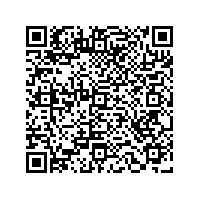
- Render the QR Code: Use the string from the
qr.codefield in the API response to generate a scannable QR code image using any QR library. - Customer Scans: The customer scans the QR code with their banking app.
- Authorize: The customer confirms the payment details and authorizes the transfer within their app.
- Real-time Confirmation: Localpayment receives instant payment notification.
- Status Update: Your system receives webhook with payment confirmation.
Best Practices for QR Display
- Minimum display size: 250x250 pixels for mobile scanning.
- Maintain 1:1 aspect ratio without distortion.
- Ensure high contrast (dark on light background).
- Add quiet zone (white border) around QR code.
- Include alt text (e.g. "QR Code Payment").
- Show Clear Payment Instructions.
- Handle Time-to-Live (TTL) and Expiration.
Option B: Display as a Copy-and-Paste Code (Copia e Cola)
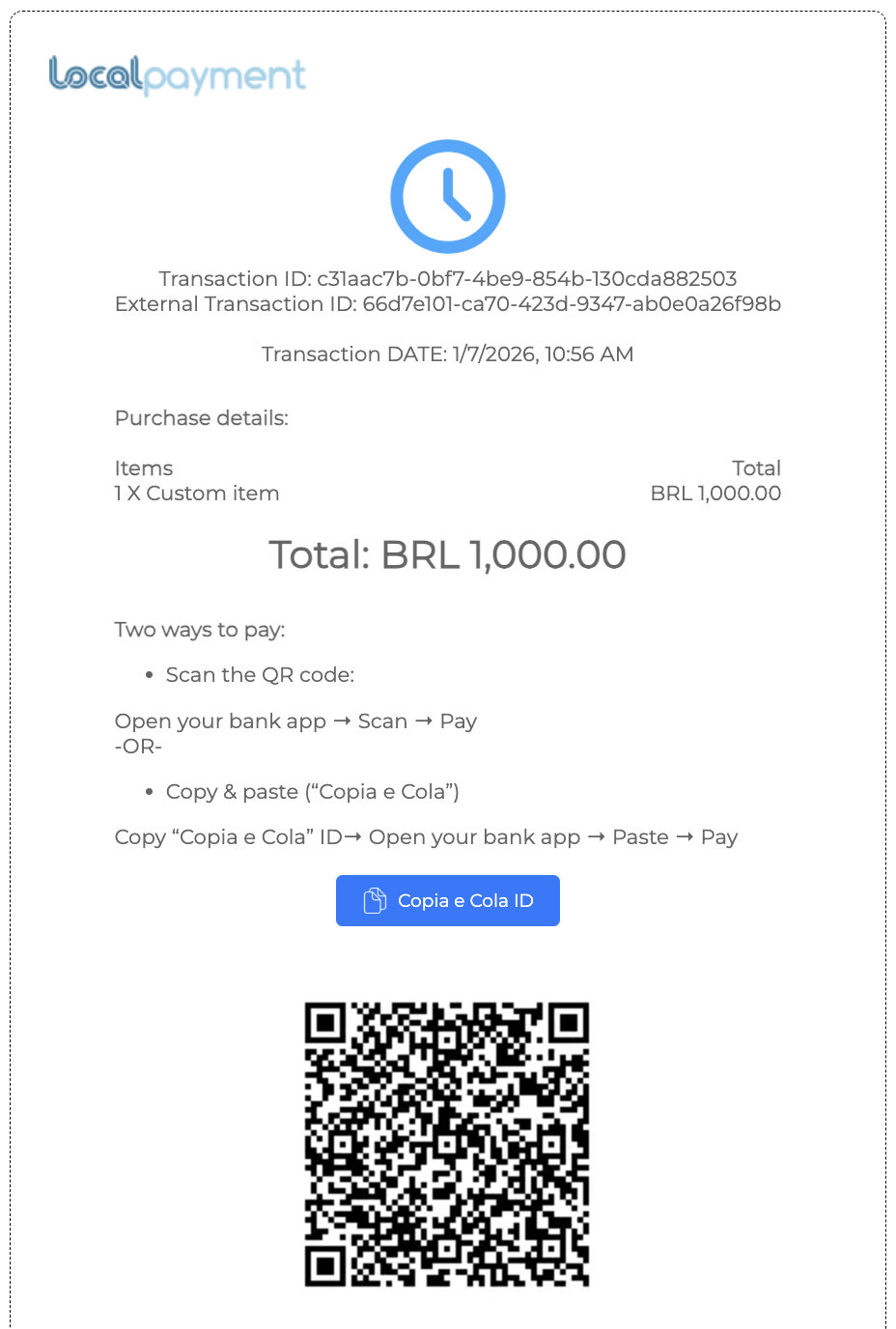
- Present the Code: Display the full string from the
qr.codefield to your customer as selectable text. - Customer Copies and Pastes: The customer copies the entire code and opens their banking or digital wallet app.
- Paste and Pay: The customer pastes the code into the app's "Pay with Pix Code" or similar field to load the payment details.
- Authorize: The customer reviews and authorizes the transfer.
- Real-time Confirmation: Localpayment receives instant payment notification.
- Status Update: Your system receives webhook with payment confirmation.
Step 4. Track Transaction Status
Monitor Pix payment progress through these methods:
Receive real-time notifications when transaction status changes. Most efficient for production environments.
Query transaction status programmatically. Useful for polling or recovering lost webhook notifications.
Visual interface for monitoring transactions. Great for manual oversight and detailed transaction analysis.
Common Status Codes
The Localpayment API provides various status codes to indicate the progress and outcome of the payment in the response.
| Code | Status | Description |
|---|---|---|
103 | APPROVED | The payin was confirmed but not credited yet. |
200 | Completed | The payin was completed. |
811 | Rejected | Requested amount is higher or lower than allowed max/min values. |
Complete Reference
View all status codes in our Transaction Status Documentation.
Testing Your Integration
Sandbox Environment
Use the staging environment for testing:
https://api.stage.localpayment.com/api/payin/Test QR Scenarios
Verify your integration handles these scenarios:
- Successful Payment: Complete Pix payment with instant settlement.
- QR Expiration: Handle expired Pix payments gracefully.
- Multiple Payment Attempts: Same QR scanned multiple times.
- Status Updates: Webhook handling and status polling.
Next Steps
After implementing Pix payments, consider these additional capabilities:
Updated 3 months ago