
Manage Virtual Account Aliases
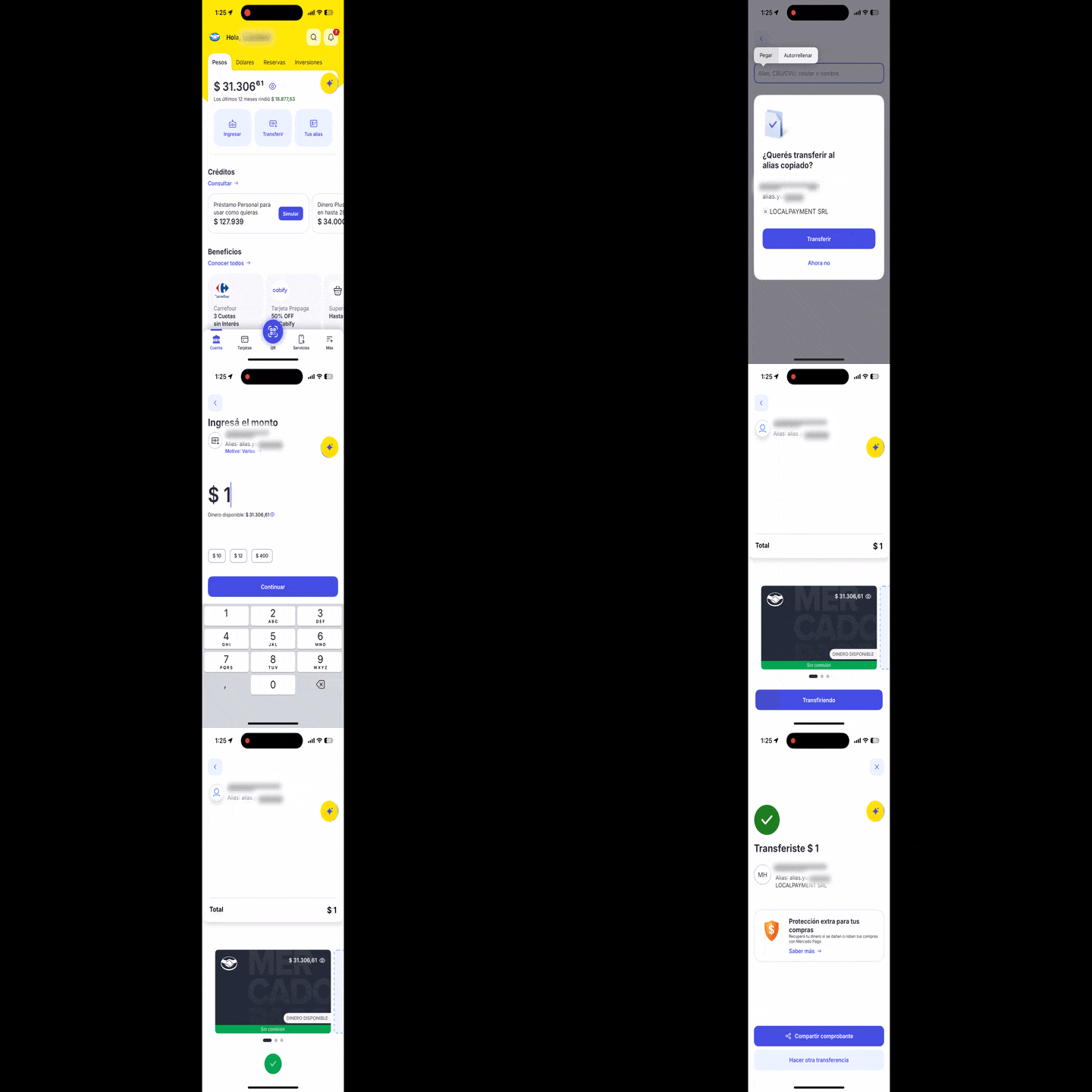
Localpayment allows you to create and manage aliases for virtual accounts in Argentina, providing memorable references that can be used instead of CVU numbers for payments.
Aliases simplify the payment process by replacing a 22-digit CVU with a short, human-readable text string that is easier to share and remember.
Availability
Virtual Account alias management is available in the following countries:
Before You Begin
Ensure you have:
- Valid API credentials (access token).
- The
externalIdof an active virtual account inCOMPLETEDstatus.
A virtual account must be in
COMPLETEDstatus before you can assign an alias to it. This status transition is automatic.
How Aliases Work in Argentina
Argentina supports CVU aliases for virtual accounts. Key characteristics:
- Format: Letters (a–z, A–Z), numbers (0–9), and dots (
.) only. No spaces, hyphens, underscores, or special characters. - Length: Between 5 and 20 characters.
- Uniqueness: The alias must be unique at the country level. This is not a platform restriction, but a requirement of the Argentine banking system. If another CVU already uses the same alias, the request will be rejected.
- Updating an alias: To update an alias, call the same endpoint with the new value once the required waiting period has elapsed.
- Change limit: Once set or updated, an alias cannot be changed again for 24 hours. The alias can be updated a maximum of 10 times in total.
- Asynchronous activation: The alias is activated in the background. An
INPROGRESSresponse does not mean the alias is already active. Verify activation using Get Virtual Account Status.
Valid alias examples: alias.example · alias.example2026 · alias.example.test
Invalid alias examples: alias example (space) · alias-example (hyphen) · alias_example (underscore) · alias@example (at sign)
Set Virtual Account Alias
Set a custom alias for an existing active virtual account. This operation both assigns a new alias and updates an existing one. The same endpoint handles both cases.
Key Request Parameters
| Parameter | Description | Required |
|---|---|---|
| externalId | The external ID of the virtual account (path parameter). | ✅ |
| type | Type of alias. For Argentina, the only valid value is C (Customizable). | ✅ |
| value | The desired alias text. Only letters, numbers, and dots (.) are allowed. Between 5 and 20 characters. | ✅ |
Example Request
curl --request POST \
     --url https://api.stage.localpayment.com/api/virtual-account/{externalId}/alias \
     --header 'Authorization: Bearer <your_access_token>' \
     --header 'Content-Type: application/json' \
     --data '{
  "type": "C",
  "value": "alias.example"
}'
See all available parameters in the API reference.
Successful Response
{
    "externalId": "550e8400-e29b-41d4-a716-446655440000",
    "alias": {
        "type": "C",
        "value": "alias.example"
    },
    "status": {
        "code": "100",
        "description": "INPROGRESS",
        "detail": "Alias creation pending confirmation"
    }
}The
INPROGRESSstatus means the request was received and is being processed asynchronously. The alias is not yet active. Use the Get Virtual Account Status endpoint to confirm activation before notifying your end users.
Verify Alias Activation
After receiving an INPROGRESS response, query the virtual account to confirm the alias is active. Send a GET request to the individual status endpoint:
curl --request GET \
     --url https://api.stage.localpayment.com/api/virtual-account/{externalId} \
     --header 'Authorization: Bearer <your_access_token>'
Once the alias is active, it appears in beneficiary.bank.account.alias:
{
    "currency": "ARS",
    "externalId": "550e8400-e29b-41d4-a716-446655440000",
    "internalId": "5aced5da-40c1-4bec-85ff-c8cd1bcb4526",
    "accountNumber": "0000003100099999999015",
    "beneficiary": {
        "type": "COMPANY",
        "name": "Example Company S.A.",
        "fullName": "Example Company S.A.",
        "document": {
            "type": "CUIT",
            "id": "30-71234567-9"
        },
        "bank": {
            "account": {
                "number": "0000003100099999999015",
                "alias": [
                    {
                        "type": "C",
                        "value": "alias.example"
                    }
                ]
            }
        }
    },
    "status": {
        "code": "200",
        "description": "COMPLETED",
        "detail": "Virtual account has been created"
    },
    "errors": [],
    "disabled": false
}
If the alias configuration fails asynchronously after an INPROGRESS response, the error will appear in the errors array of this same response. Poll the status endpoint until errors is empty and the alias is visible in beneficiary.bank.account.alias.
Key Response Fields
| Field | Description |
|---|---|
externalId | The external ID of the virtual account the alias was requested for. |
alias.type | The alias type from the request (C). |
alias.value | The alias value from the request. |
status.code | 100: operation in progress. |
status.description | INPROGRESS: alias activation is being processed asynchronously. |
Error Responses
The following error codes apply to the synchronous response. If the initial response is INPROGRESS, the operation has been accepted, but errors may still occur during asynchronous processing. To detect these, query Get Virtual Account Status and check the errors array.
| Code | Description | Detail |
|---|---|---|
776 | REJECTED | The alias is already in use; please select a different alias. |
777 | REJECTED | The alias is invalid; please enter a valid alias. |
778 | REJECTED | The alias cannot be changed now; you must wait 24 hours after the last update. |
779 | REJECTED | System error to generate alias. |
896 | REJECTED | Alias already assigned to this virtual account. |
{
    "externalId": "550e8400-e29b-41d4-a716-446655440000",
    "alias": {
        "type": "C",
        "value": "alias.example"
    },
    "status": {
        "code": "776",
        "description": "REJECTED",
        "detail": "The alias is already in use; please select a different alias."
    }
}
Common Error Scenarios
| Code | Cause | Recommended Fix |
|---|---|---|
776 | Alias already in use by another CVU. | Choose a different, unique alias value. |
777 | Alias contains invalid characters, incorrect format, or length outside 5–20 characters. | Check the value field: only letters, numbers, and dots (.) are allowed, between 5 and 20 characters. |
778 | 24-hour change period not elapsed since the last alias update. | Wait at least 24 hours before retrying. |
779 | Internal system error during alias generation. | Retry the request. If the issue persists, contact support. |
896 | Alias already assigned to this virtual account. | Use Get Virtual Account Status to check the alias already associated with the account. |
Demo
Next Steps
Updated 25 days ago